
클라이언트와 서버의 통신
웹 애플리케이션은 클라이언트(웹 브라우저)와 서버가 통신하며 데이터를 주고 받는다.
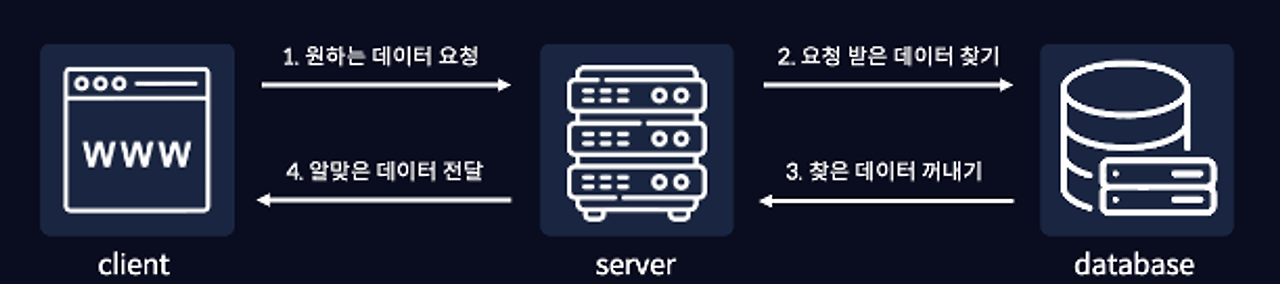
통신 과정
- 웹브라우저에서 서버에게 원하는 데이터를 요청한다.
- 서버는 데이터베이스에서 요청받은 데이터를 찾는다.
- 서버가 데이터베이스에서 찾은 데이터를 꺼내온다.
- 꺼내온 데이터를 서버가 웹브라우저에게 전달한다.
클라이언트와 서버의 통신은 클라이언트가 서버에 데이터를 요청하면, 서버는 데이터베이스에서 요청받은 데이터를 찾아서 꺼내온 뒤 다시 클라이언트에게 전달하는 과정이라고 할 수 있다.
API란?
API(Application Programming Interface) 란 컴퓨터나 컴퓨터 프로그램 사이의 연결을 말한다.
좀 더 풀어서 얘기하자면 웹 브라우저와 같은 클라이언트와 서버 사이의 연결, 즉 서버에 원하는 데이터를 요청하고 전달받는 방법이라고 할 수 있다.
API 호출
JSON
JSON(JavaScript Object Notation) 은 자바스크립트에서 객체 형태의 데이터를 가독성 있게 나타내기 위한 표기법이다.
[
  {
    "userId": 1,
    "id": 1,
    "title": "sunt aut facere repellat provident occaecati excepturi optio reprehenderit",
    "body": "quia et suscipit\nsuscipit recusandae consequuntur expedita et cum\nreprehenderit molestiae ut ut quas totam\nnostrum rerum est autem sunt rem eveniet architecto"
  },
  {
    "userId": 1,
    "id": 2,
    "title": "qui est esse",
    "body": "est rerum tempore vitae\nsequi sint nihil reprehenderit dolor beatae ea dolores neque\nfugiat blanditiis voluptate porro vel nihil molestiae ut reiciendis\nqui aperiam non debitis possimus qui neque nisi nulla"
  }
]
위 데이터는 jsonplaceholder.typicode.com/posts라는 API의 호출 결과다.
이렇게 API 주소(API URL)를 통해 호출할 수 있고, 호출을 하면 서버는 위와 같은 JSON 데이터를 전달해준다.
fetch
자바스크립트에는 fetch라는 내장 함수를 이용해 API를 호출할 수 있다.
const response = fetch('https://jsonplaceholder.typicode.com/posts');

console.log(response);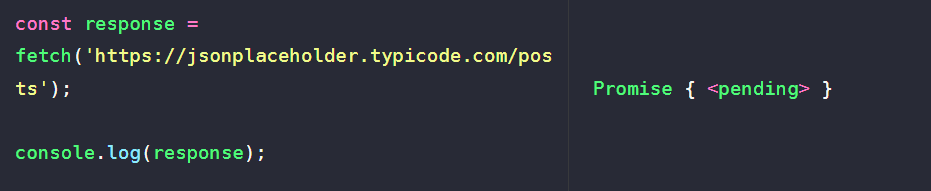
response라는 변수에 API 호출 결과를 담아 출력해보면 Promise {<pending>}이 출력되는 것을 볼 수 있다.
Promise 객체를 반환하는 함수는 비동기 처리를 하는 함수다. 따라서 then 메서드를 사용해 결과값을 출력할 수 있고, catch 메서드를 이용해 에러 핸들링이 가능하다.
const response = fetch('https://jsonplaceholder.typicode.com/posts')
  .then((res) => console.log(res))
  .catch((err) => console.log(err));

console.log(response);
이렇게 fetch를 통해 API를 호출하면 Response라는 API 응답 객체 그 자체를 반환한다.
JSON 데이터 가져오기
우리가 원하는 실제 데이터를 받기 위해 getData함수를 생성하고 그 안에서 API를 호출해보자.
async와 await
async와 await은 Promise 객체를 더욱 쉽게 작성할 수 있고, 직관적으로 코드를 해석할 수 있는 문법이다. Promise 객체Promise 객체의 필요성자바스크립트에서 비동기 작업을 처리하는 가장 기본적인 방
devmark.tistory.com
const getData = async () => {
  const res = await fetch('https://jsonplaceholder.typicode.com/posts');
}

getData();
자바스크립트에서 JSON 데이터를 사용하기 위해서는 json() 메서드를 사용해 문자열을 파싱하여 객체 형태로 변환해야 한다.
const getData = async () => {
  const res = await fetch('https://jsonplaceholder.typicode.com/posts');
  const data = await res.json();
  console.log(data);
}

getData();
이제 JSON 데이터가 자바스크립트 객체 배열로 변환되어 사용할 수 있게 되었다.
에러 처리
try-catch로 에러처리를 하고, 이를 확인하기 위해 API주소를 임의로 변경해보면 다음과 같이 에러가 출력된다.
const getData = async () => {
  try {
    const res = await fetch('https://jsonplaceholder.typicode.com/postssss');  // 잘못된 URL
    const data = await res.json();
    console.log(data);
  } catch (error) {
    console.log(error);
  }
}

getData();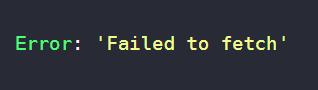
이렇게 네트워크 오류나 잘못된 URL로 인해 요청이 실패하면 catch 블록에서 에러를 잡아 처리할 수 있다.
덧붙여 아래와 같이 res.ok를 확인하여 HTTP 상태 코드가 200-299 범위인지 체크하면 더 안전한 에러 처리가 가능하다.
const getData = async () => {
  try {
    const res = await fetch('https://jsonplaceholder.typicode.com/posts');

    // HTTP 상태 코드 확인
    if (!res.ok) {
      throw new Error(`HTTP error! status: ${res.status}`);
    }

    const data = await res.json();
    console.log(data);
  } catch (error) {
    console.error('데이터를 불러오는데 실패했습니다:', error);
  }
}

getData();'Frontend > JavaScript' 카테고리의 다른 글
| Vanilla JS 컴포넌트 설계 패턴 (0) | 2025.11.10 |
|---|---|
| 화살표 함수와 객체 (0) | 2025.11.09 |
| async와 await (0) | 2025.10.31 |
| Promise 객체 (0) | 2025.10.31 |
| 자바스크립트 비동기 처리 (0) | 2025.10.31 |