사용자가 작성한 일기에 대해 GPT API를 활용하여 상담 전문가 관점의 답장을 받을 수 있는 기능을 구현했다.
GPT API 연동
프롬프트 설정
GPT API에 전달할 메시지 구조를 정의했다.
const messages = [
  // 역할 정의
  {
    role: "system",
    content:
      "You are a Counseling Expert, specializing in personal development through diary writing.",
  },

  // 사용자 일기 입력
  {
    role: "user",
    content: `
      """
      ${prompt}
      """`,
  },

  // AI 지시 사항
  {
    role: "user",
    content: `1. Diary Entry Analysis: Identify key themes and emotional expressions in the diary entry.
    2. [Emotional Understanding]: Reflect on the emotions expressed and their context.
    3. [Constructive Feedback]: Offer feedback based on the diary entry, including strategies for overcoming challenges.
    4. [Encouragement and Support]: Conclude with words of encouragement and support.
    5. [answer]: Finally, provide a brief one-line summary of your advice in Korean as the final response.

    Translate into Korean and Use the output in the following JSON format:
    {
      answer: "here is [answer]"
    }
    `,
  },
];- 역할 정의: AI가 개인 발달을 위한 일기 상담 전문가 역할 수행
- 사용자 일기 입력: 사용자가 제공한 일기 내용을 바탕으로 분석 요청
- AI 지시 사항: 일기 분석, 감정 이해, 피드백 제공, 격려 및 지지, 요약 등 수행할 작업 정의
- 출력 형식: 최종 답변을 JSON 형식으로 반환
API 호출 함수
export const CallGPT = async ({ prompt }: { prompt: string }) => {
  const messages = [
    // 프롬프트 설정
  ];

  // API 요청
  const response = await fetch("https://api.openai.com/v1/chat/completions", {
    method: "POST",
    headers: {
      "Content-Type": "application/json",  // JSON 형식 데이터 전송
      Authorization: `Bearer ${import.meta.env.VITE_GPT_API_KEY}`,  // API 인증 키
    },
    body: JSON.stringify({
      model: "gpt-3.5-turbo",  // 사용할 GPT 모델
      messages: messages,  // 전달할 입력 데이터
      temperature: 0.7,  // 응답의 창의성 정도 (0~1)
      max_tokens: 1_000,  // 응답의 최대 길이
    }),
  });

  // 응답 데이터 처리
  const responseData = await response.json();
  const message = responseData.choices[0].message.content;

  return message;
};
사용자의 일기 내용을 GPT API로 전송하고, JSON 형식으로 받은 응답에서 필요한 정보를 추출하여 반환한다.
답장 받기 기능
상태 관리와 API 호출
const [gptData, setGptData] = useState("");
const [isLoading, setIsLoading] = useState(false);
const [hasReceived, setHasReceived] = useState(false);

const handleClickAPICall = async () => {
  try {
    setIsLoading(true);
    const message = await CallGPT({
      prompt: JSON.stringify(content),
    });
    setHasReceived(true);
    setGptData(JSON.parse(message));
  } catch (error) {
    // 에러 처리
  } finally {
    setIsLoading(false);
  }
};gptData: GPT API 응답 데이터 저장isLoading: API 호출 중 로딩 상태 관리hasReceived: 답장 수신 여부 관리
handleClickAPICall 함수는 CallGPT를 호출하여 API 요청을 처리하고, 각 상태를 업데이트한다.
로딩 상태 및 답장 표시
export default function Letter({ letterData, isLoading }) {
  return (
    <>
      {isLoading
        ? "답장이 오고 있어요.. 잠시만 기다려주세요 📮"
        : letterData
      }
    </>
  );
}
<Letter letterData={gptData} isLoading={isLoading} />API 응답을 기다리는 동안 로딩 메시지를 표시하고, 응답을 받으면 답장 내용을 사용자에게 표시한다.
사용자 인터랙션과 버튼 상태
<button
  onClick={handleClickAPICall}
  disabled={hasReceived}  // 답장 수신 시 버튼 비활성화
>
  {hasReceived ? "답장이 도착했어요" : "답장 받기"}
</button>
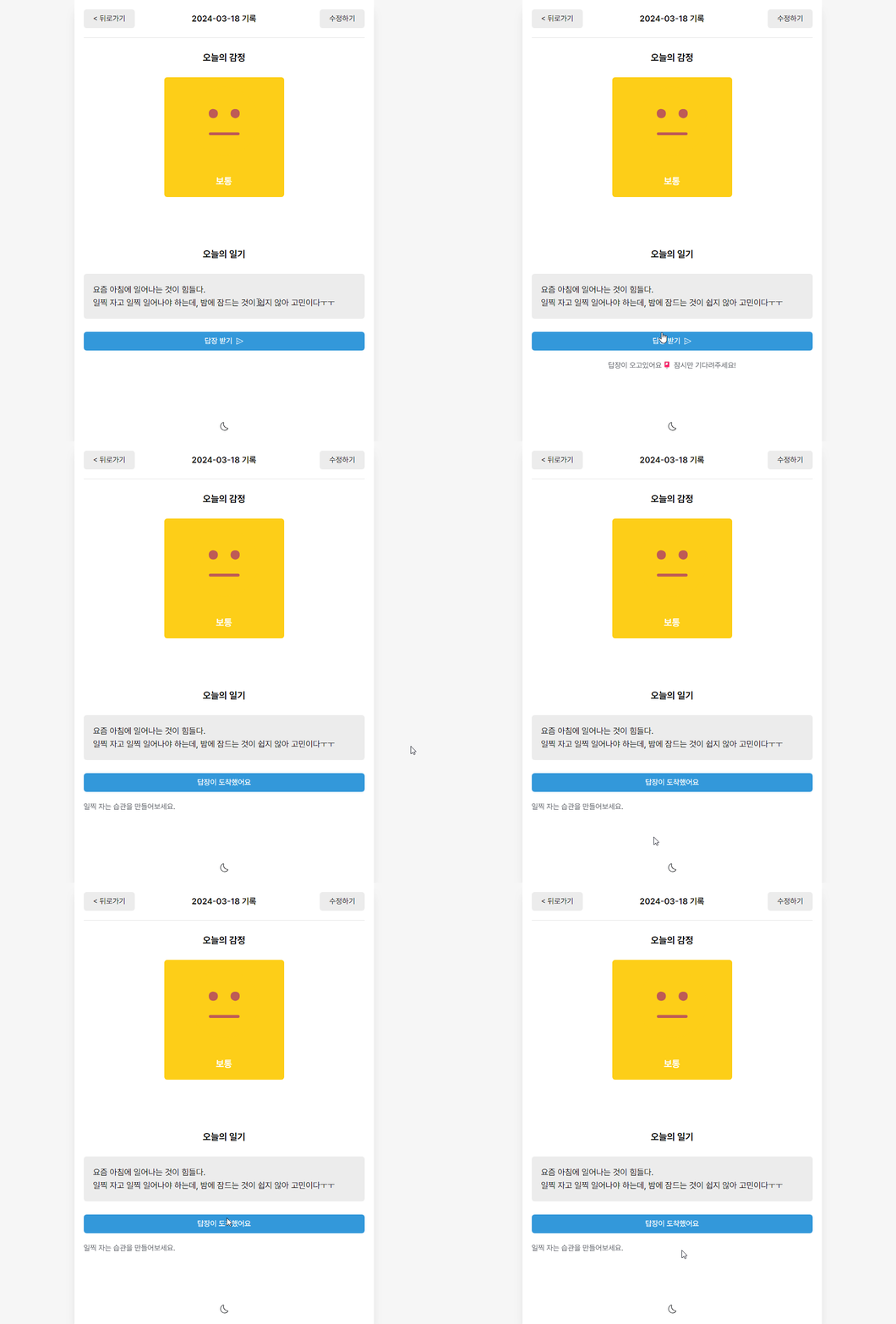
사용자가 버튼을 클릭하면 handleClickAPICall 함수를 통해 API 호출이 이루어진다. hasReceived 상태에 따라 버튼의 텍스트와 활성화 상태가 변경되어, 중복 호출을 방지한다.
결과
'Dev Log' 카테고리의 다른 글
| [PearNutter] 소셜미디어 앱 마이그레이션 계획 (0) | 2025.11.07 |
|---|---|
| [AI 감성 일기장] LocalStorage를 활용한 데이터 영속성 구현 (0) | 2025.11.07 |
| [AI 감성 일기장] Tailwind CSS와 Context API를 활용한 다크모드 구현 (0) | 2025.11.07 |
| [AI 감성 일기장] Diary 페이지 일기 상세보기 기능 구현 (0) | 2025.11.07 |
| [AI 감성 일기장] New 페이지 일기 작성 기능 구현 (0) | 2025.11.07 |